Search, Filters, and IDs
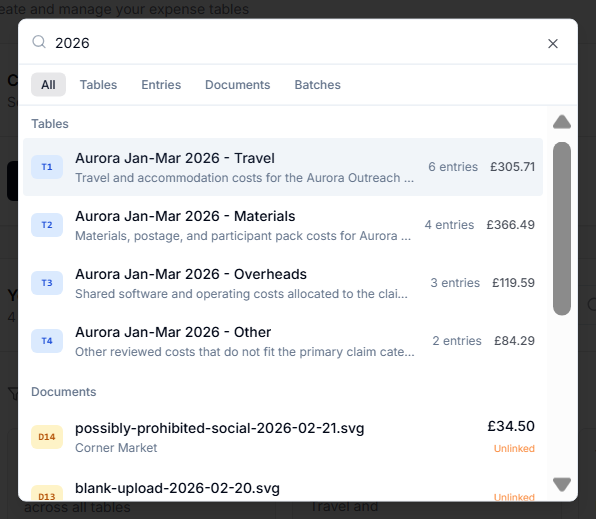
Use global search from the sidebar to find:
Global Search
Use global search from the sidebar to find:
- Tables,
- Entries,
- Documents,
- Batches.
Global search can match names, descriptions, vendors, purchasers, grant names, document names, tags, and IDs.
Sequential IDs
GrantKeeper gives organization-scoped IDs to important records:
T1,T2,T3for Tables,E1,E2,E3for Entries,D1,D2,D3for Documents.
Use these IDs when discussing a specific item. For example, asking someone to check D128 is clearer than describing a receipt by filename.
Older records may show fallback IDs if they have not been backfilled.
Include and Exclude Search
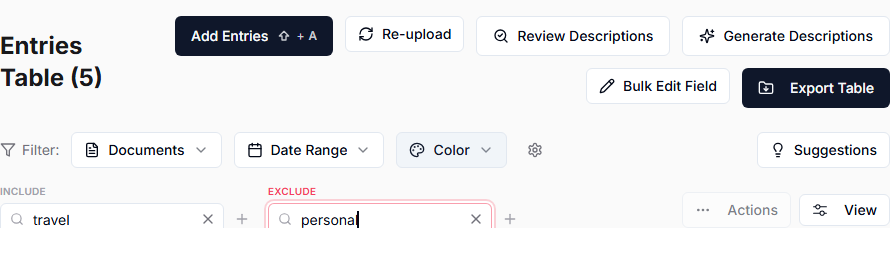
Tables and Documents include search controls that can include certain words and exclude others.
Examples:
- Include
traveland excludepersonalto find company-card travel items. - Include a purchaser name to find their entries.
- Exclude a known category to focus on everything else.
Quick Filters
Documents includes quick filters for common words:
- Materials,
- Facilities,
- Travel,
- Personal.