Topic 8 of 12 · Review an Import Batch
Review Receipts
Review receipt warnings before saving an import batch. Every receipt is read during the import, several at a time, and the **Reading receipts** step counts them as they finish. A receipt is accepted when the bank charge equals its total, a card or wallet payment printed on it, one of its invoice lines, or the balance after a printed credit. Several receipts on one entry are accepted when one of them shows the charge or their totals add up to it. Anything else is listed under **Receipt review** when you open the batch. A warning never changes the bank amount.
- Open Review receipt beside an entry’s evidence, or Review receipts in the batch summary.
- Compare the original transaction amount and currency with the receipt previews and extracted totals.
- Replace a wrong receipt or Remove an attachment. Removing it leaves the file in Documents.
- If the receipt is correct despite the difference, select Keep receipt or Keep receipts. Its VAT is then applied in proportion to the amount the bank charged. Use Review again to reopen a dismissed warning.
- Use Read again in the receipt's options menu when a receipt was misread or could not be read.
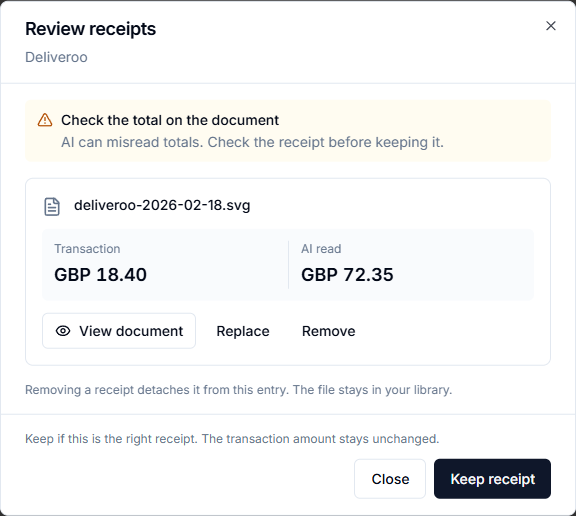
A warning can mean a different amount or currency, an uncertain total or a file that could not be read. Tips, split payments and multiple receipts can explain legitimate differences. Keeping a receipt dismisses the warning; it does not establish grant eligibility. Changing the amount or evidence can require another review.
Checks run while the batch is open and resume when it is reopened. The Save to Tables dialog allows saving with checks pending or needing review, but saving removes the batch. Complete this review first where possible. Saved Tables and manual entries do not have this same automatic batch-review workflow.